
Making a Contribution Using Realm
REALM lets you easily make a one-time donation, or set up ongoing donations, to UUCWC. You may make a donation with or without logging into a Realm account.
You can access Realm, and other giving options through the giving tab on the UUCWC website https://www.uucwc.org/giving/donate/. Or log in to your Realm account at https://onrealm.org and select the giving tab from the menu on the lefthand side of the page and then click on 
If you have a Realm account:

Select the fund want to donate to from the drop-down menu. If you have additional information that you want us to know about your donation, please note it in the menu.
You may donate to more than one fund by clicking on the “another fund” button.
Make a one-time donation by clicking on the “Give Once” tab. Set up recurring donations by using the “Give Multiple Times” tab, and then select your giving frequency and beginning and end dates.
Your total donation is noted at the bottom of the donation screen. If everything looks okay, select continue.
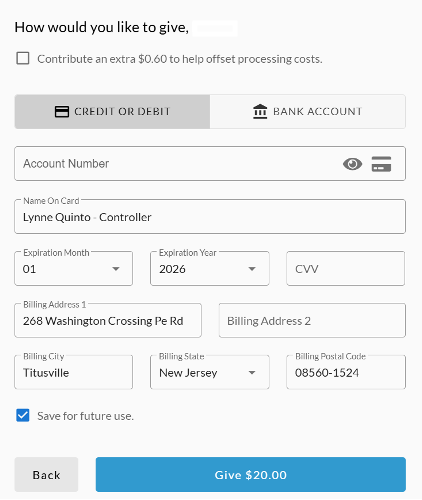
Check the box at the top of the screen if you would like to add our processing costs to your donation.
Next choose if you want to use a credit card or have the donation come directly from your bank account. Your name and address will be filled in as entered on your account. Make any necessary corrections.
If you want this donation method saved for future donations, check the box “Save for Future Use.”
If everything is okay, click the Give button at the bottom of the page.
All payments made through Realm are sent to UUCWC electronically, and your financial information is not visible to anybody at UUCWC.
If you don’t have a Realm account, access Realm via the UUCWC website’s giving tab at https://www.uucwc.org/giving/donate/.
The screens will be similar to those above, but you will need to enter your contact information. You may also continue to make donations via PayPal or Venmo, or by mailing a check.
If you have any questions, please contact our office at uucwc@uucwc.org.